WA Leads Software that drives revenue
Unlock the full potential of WhatsApp marketing with WA Leads – the smart, scalable, and automated solution designed to boost engagement and maximize revenue. From automated campaigns to personalized messaging, our software helps businesses generate high-quality leads, nurture customer relationships, and drive conversions effortlessly. Transform conversations into sales and scale your business with WA Leads today!
What we do
Empowering Businesses with Smart & Scalable WhatsApp Marketing Solutions!
In today’s digital world, businesses need fast and effective communication to stay ahead. Our smart and scalable WhatsApp marketing solutions help you connect with customers instantly, drive engagement, and increase sales. With automated messaging, bulk campaigns, and personalized interactions, we make it easier for you to reach your audience effortlessly. Our platform ensures higher open rates, better conversions, and seamless customer support. Empower your business with the power of WhatsApp and take your marketing to the next level! 🚀
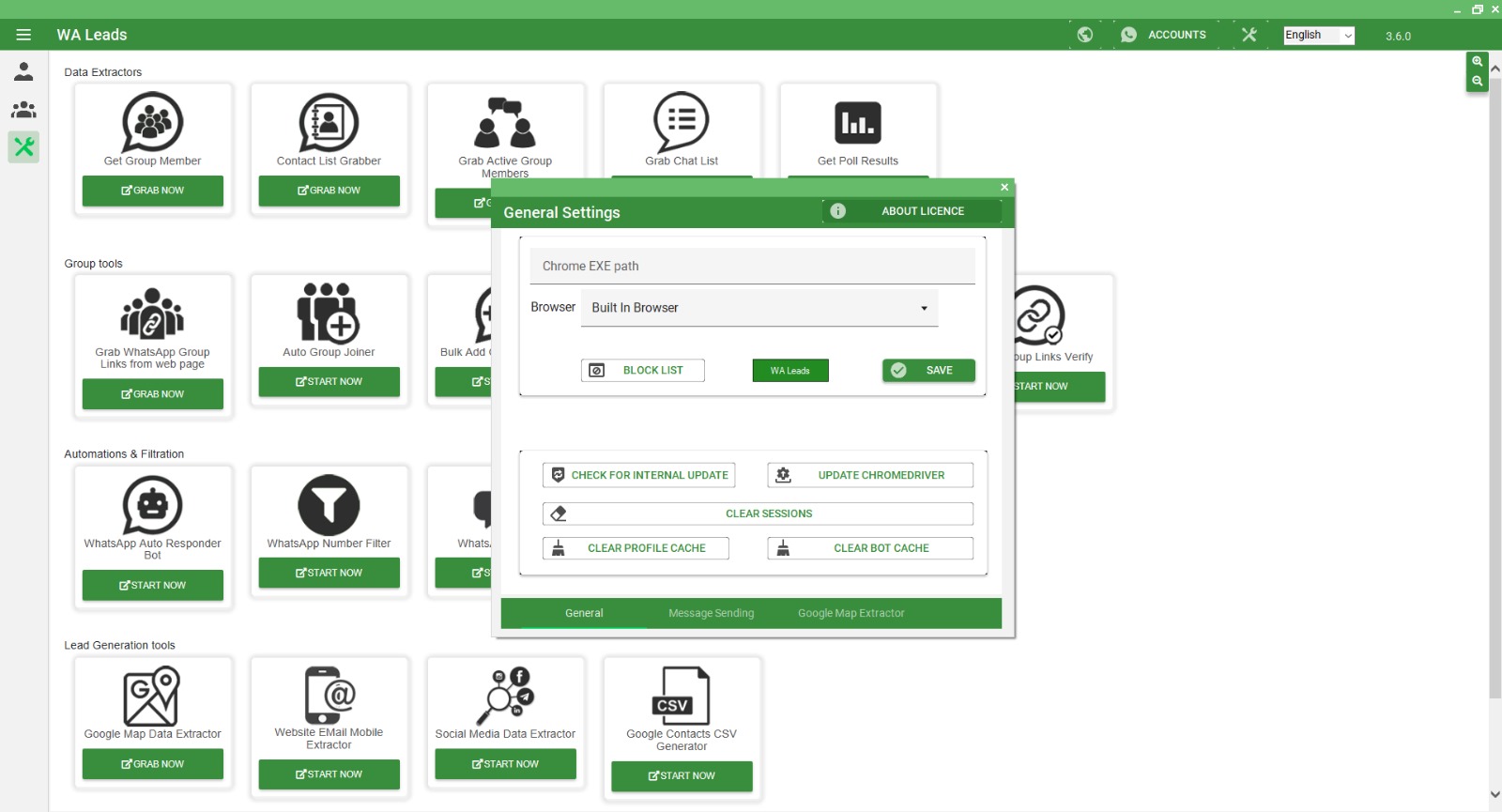
WA Leads - General Settings Overview
The General Settings section of WA Leads provides users with essential configuration options to enhance their WhatsApp marketing experience. Here’s a breakdown of its key features:
Chrome EXE Path & Browser Selection
- Users can set the Chrome executable path for compatibility.
- Choose between Built-in Browser or an external browser for operations.
Block List Management
- Easily manage blocked contacts to prevent unnecessary outreach.
WA Leads License & Updates
- Includes an “About License” section for managing software licensing.
- Options to check for internal updates and update the ChromeDriver ensure the software remains up-to-date.
Session & Cache Management
- Users can clear sessions, profile cache, and bot cache to maintain smooth software performance.
Advanced Settings
- Sections for Message Sending and Google Map Extractor allow further customization of lead generation and messaging strategies.
This intuitive and user-friendly interface ensures businesses can easily configure their settings for efficient, automated, and secure WhatsApp marketing. 🚀
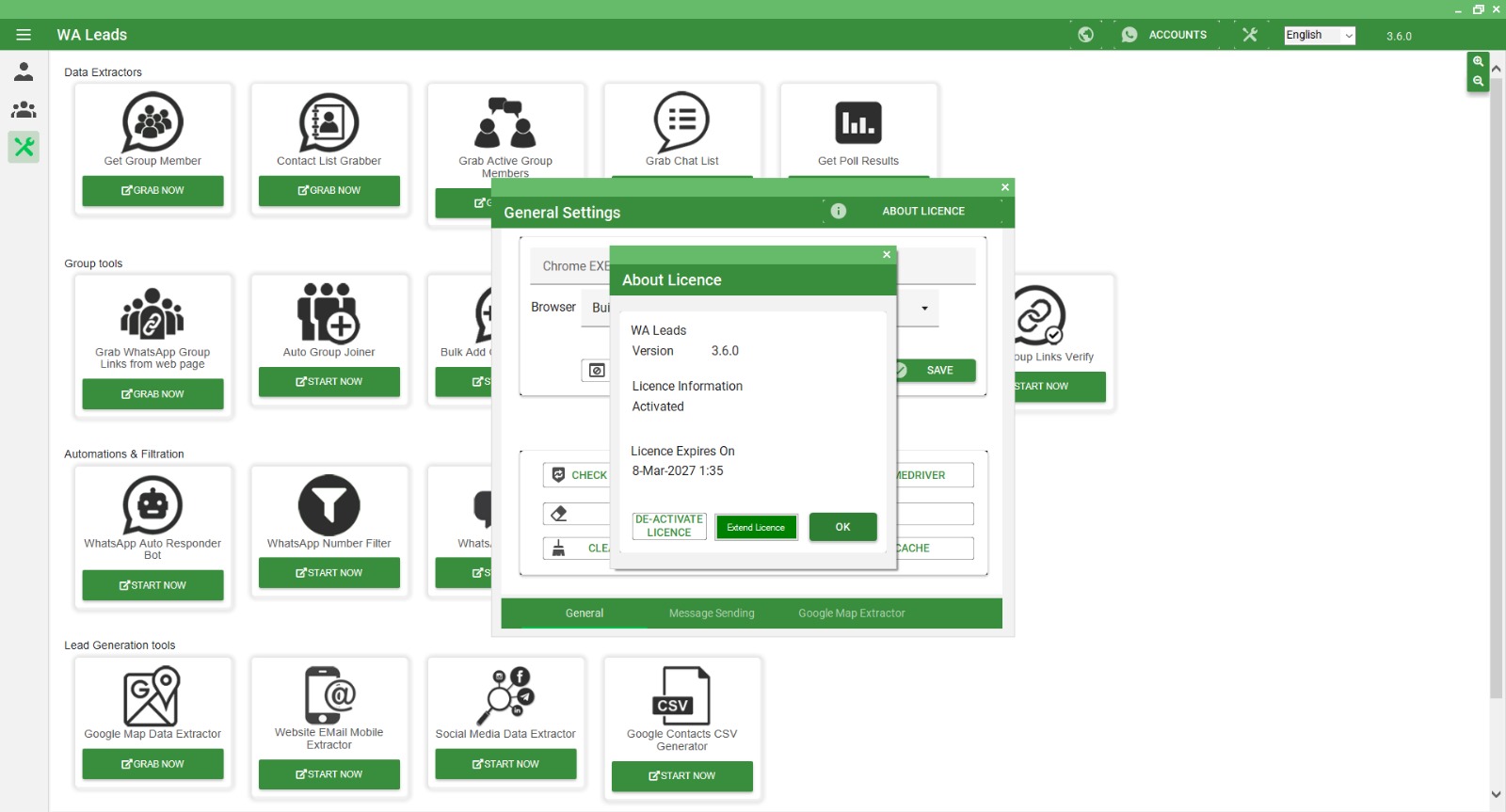
WA Leads - License Information Overview
The License Information section in WA Leads provides details about the software’s activation status and license management. Key elements include:
Software Version
- Displays the current WA Leads version (3.6.0) for easy tracking of updates and compatibility.
License Status
- Indicates whether the license is Activated, ensuring users can access all features without restrictions.
License Expiry Date
- Shows the expiration date (March 8, 2027, at 1:35), allowing users to manage renewals in advance.
License Management Options
- Deactivate License: Users can disable the current license if needed.
- Extend License: Provides an option to renew or extend the software usage period.
- OK Button: Confirms and closes the license details window.
This section ensures that users stay informed about their subscription status, helping them maintain uninterrupted access to WA Leads’ powerful lead generation tools. 🚀
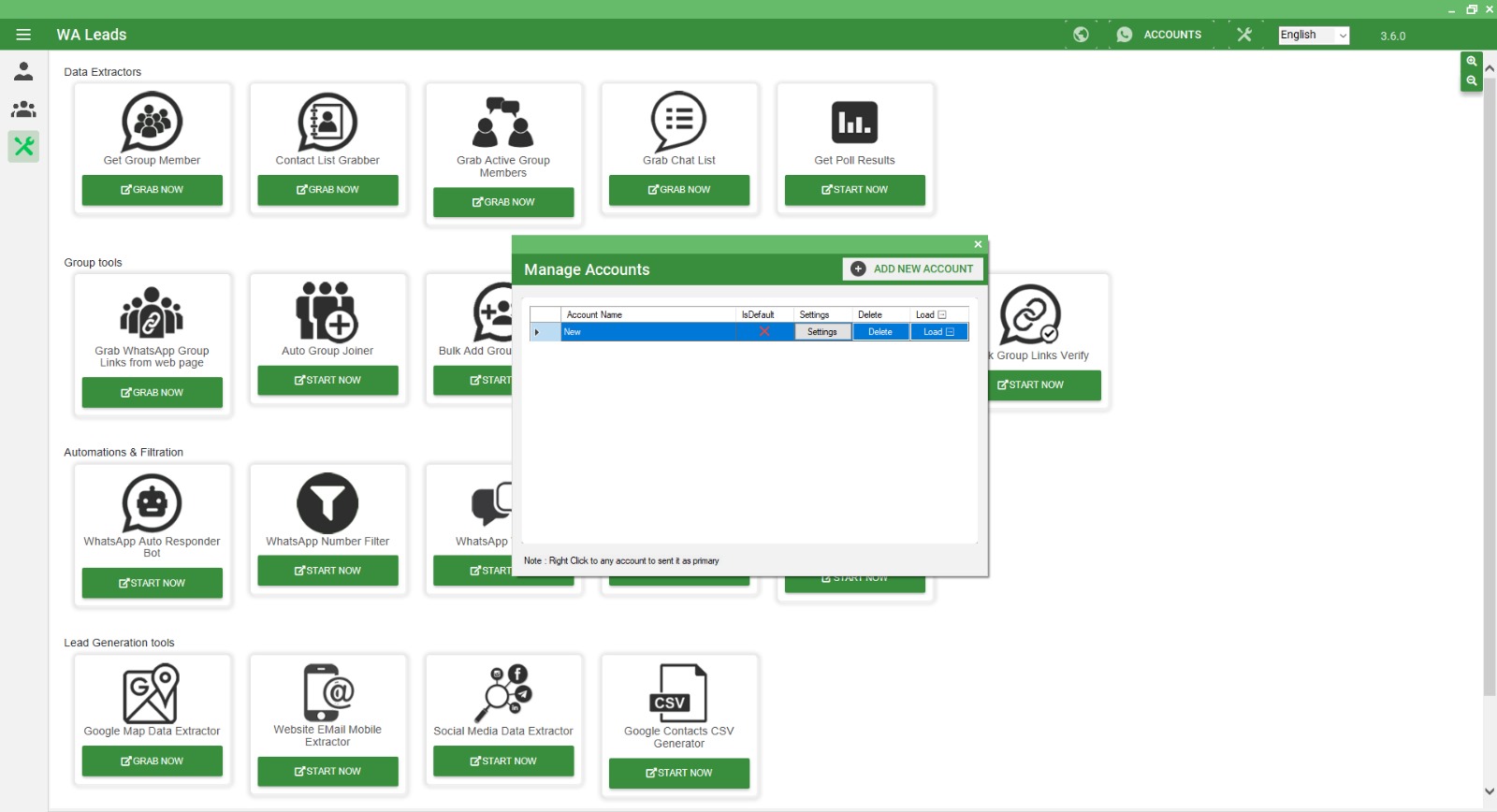
WA Leads - Open and Manage Accounts
Manage Accounts Panel (Popup Window)
The Manage Accounts window helps users add and manage multiple WhatsApp accounts.
A. Account List
- Displays the Account Name (e.g., “New”).
- IsDefault – Shows if the account is set as the default (marked with an “X”).
- Settings – Allows users to configure account settings.
- Delete – Remove an account from the list.
- Load – Load the selected account for use.
B. Add New Account
- Clicking “ADD NEW ACCOUNT” lets users add multiple WhatsApp accounts.
C. Right-Click Options
- Right-clicking an account allows the user to set it as primary.
3. How This Feature Helps?
- Enables switching between multiple WhatsApp accounts for bulk messaging.
- Helps manage different business or client accounts in one platform.
- Allows customized settings for each account.
The Open and Manage Accounts feature in WA Leads simplifies handling multiple WhatsApp accounts for marketing automation. This is useful for businesses and marketers running campaigns across different accounts.
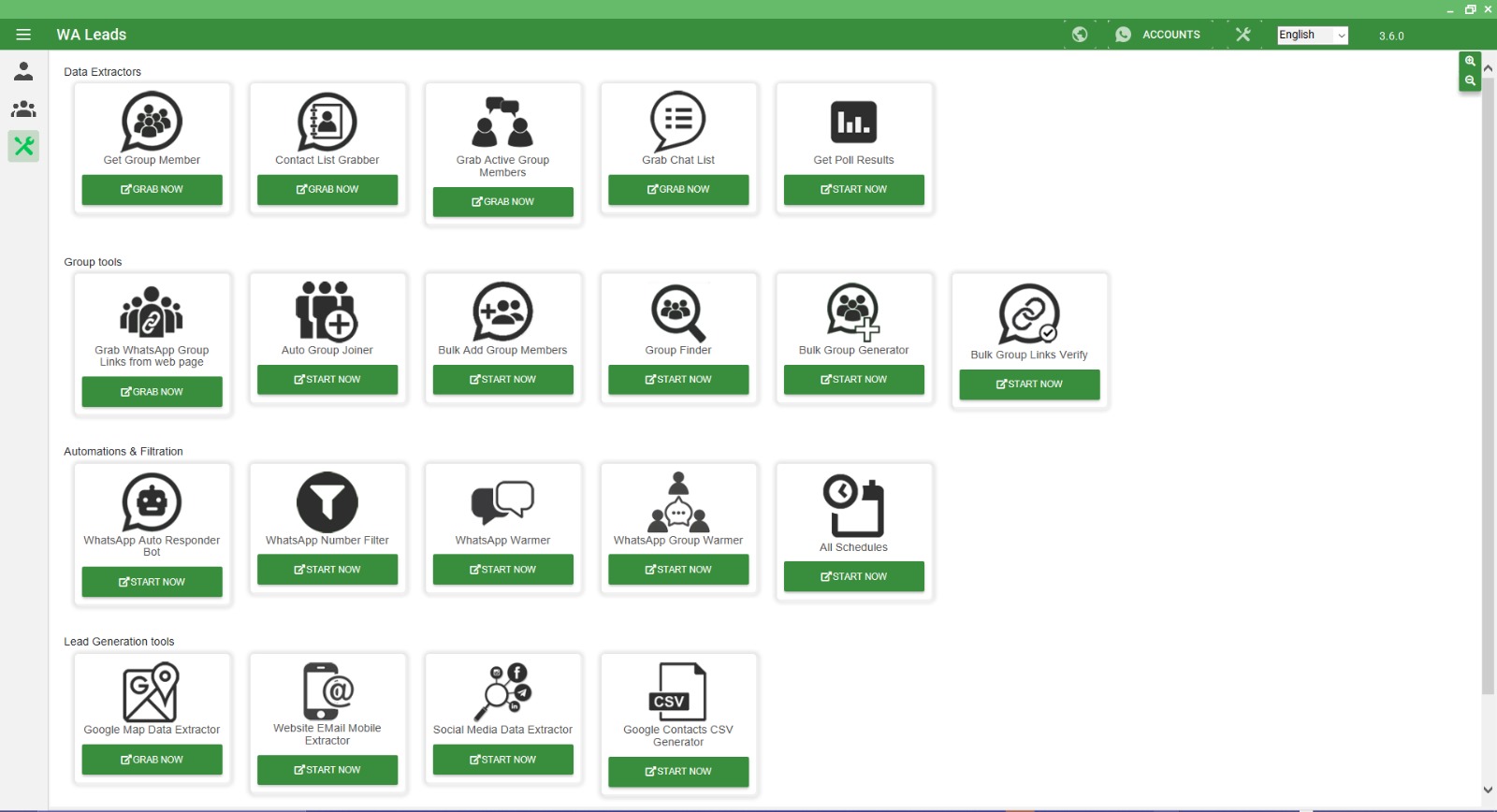
WA Leads - Dashboard Overview
1. Data Extractors 
- Get Group Member – Extracts members from WhatsApp groups.
- Contact List Grabber – Retrieves saved contacts from WhatsApp.
- Grab Active Group Members – Extracts active users in a WhatsApp group.
- Grab Chat List – Collects chat details from WhatsApp.
- Get Poll Results – Fetches results from WhatsApp polls.
2. Group Tools 
- Grab WhatsApp Group Links from Web Page – Extracts group invite links from websites.
- Auto Group Joiner – Automatically joins WhatsApp groups.
- Bulk Add Group Members – Adds multiple contacts to a group at once.
- Group Finder – Helps locate relevant WhatsApp groups.
- Bulk Group Generator – Creates multiple WhatsApp groups.
- Bulk Group Links Verify – Checks the validity of WhatsApp group links.
3. Automations & Filtration 
- WhatsApp Auto Responder Bot – Automatically replies to messages.
- WhatsApp Number Filter – Filters valid WhatsApp numbers.
- WhatsApp Warmer – Ensures WhatsApp accounts stay active.
- WhatsApp Group Warmer – Keeps WhatsApp groups active.
- All Schedules – Manages scheduled tasks for automation.
4. Lead Generation Tools 
- Google Map Data Extractor – Extracts business data from Google Maps.
- Website Email Mobile Extractor – Extracts emails and mobile numbers from websites.
- Social Media Data Extractor – Gathers data from social media platforms.
- Google Contacts CSV Generator – Exports Google Contacts into CSV format.
Other Interface Features
- Top Menu: Includes language selection, account management, and version details.
- Left Sidebar: Provides quick access to essential functions.
This dashboard is designed to streamline WhatsApp marketing, automation, and lead generation for businesses and marketers.
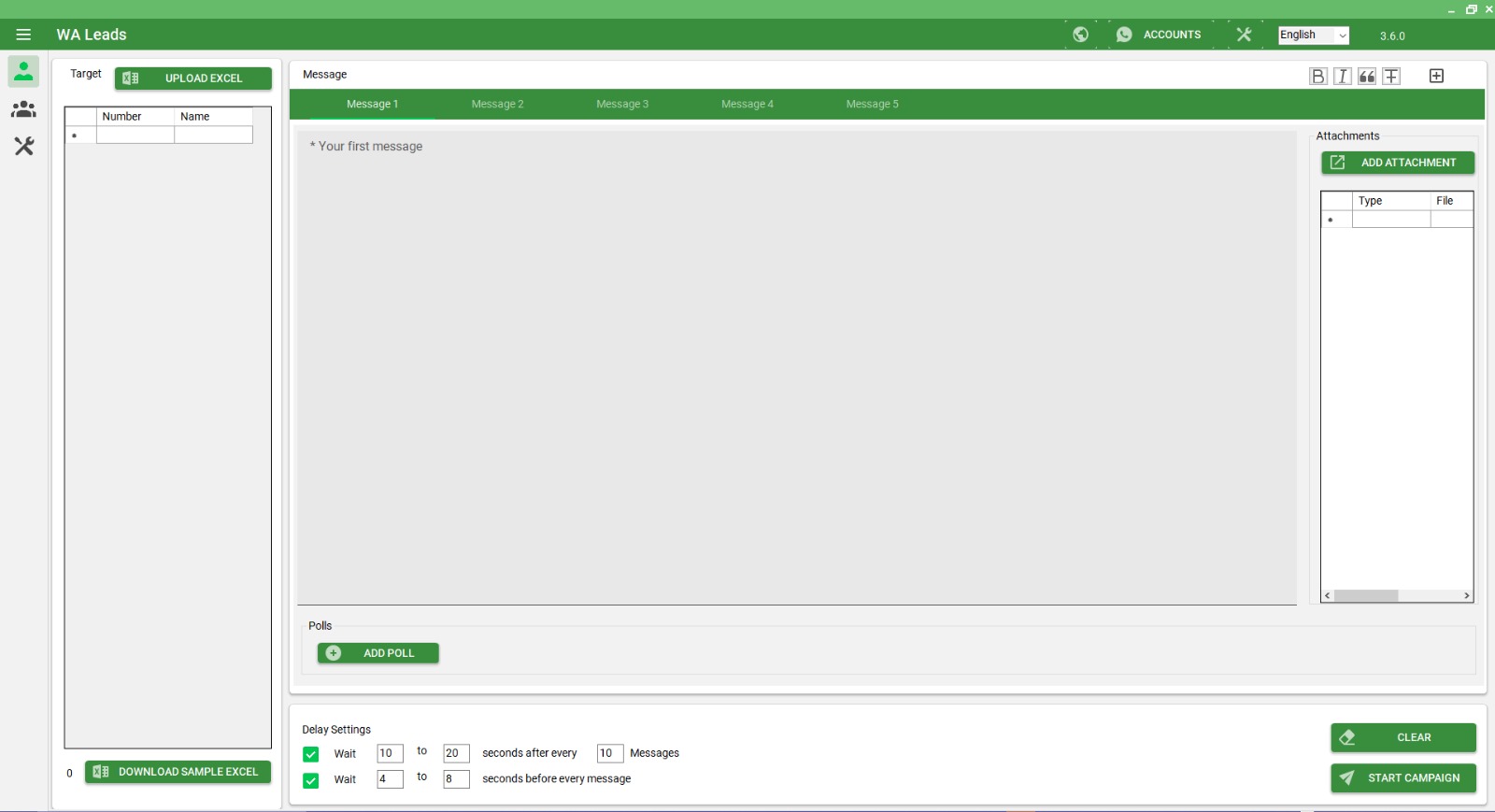
Messages and Campaign Settings of WA Leads Software
WA Leads is a bulk messaging software designed for sending WhatsApp messages to multiple contacts efficiently. Below is a detailed explanation of all the features shown in the image.
1. Messages Section
This section allows users to create, customize, and manage the messages that will be sent to contacts.
A. Message Tabs (Message 1 to Message 5)
- You can create up to five different messages to send variations of text, reducing the risk of spam detection.
- The first message is pre-filled with “Your first message” as a placeholder.
B. Attachments Panel
- Allows users to attach files (images, videos, documents, etc.) to messages.
- The “ADD ATTACHMENT” button is used to upload files.
C. Polls Section
- The “ADD POLL” button allows users to include interactive polls in messages.
- Polls can be useful for engaging leads and collecting feedback.
2. Target Contacts Section
This section manages the recipient list for the campaign.
A. Upload Contacts
- The “UPLOAD EXCEL” button lets users upload an Excel file containing phone numbers and names of recipients.
- The format must match the software’s requirements (use the sample Excel file for reference).
B. Download Sample Excel
- A sample Excel file can be downloaded by clicking “DOWNLOAD SAMPLE EXCEL.”
- This helps users format their contacts correctly before uploading.
3. Campaign Settings
This section configures how messages are sent, including time delays and bulk messaging limits.
A. Delay Settings
To make messages appear more natural and avoid WhatsApp restrictions, the software includes delay settings:
- Wait 10 to 20 seconds after every 10 messages – Ensures messages are not sent too quickly, mimicking human behavior.
- Wait 4 to 8 seconds before every message – Introduces a short delay before sending each message to avoid spam detection.
B. Start or Reset the Campaign
- “START CAMPAIGN” – Begins sending messages according to the configured settings.
- “CLEAR” – Resets all settings and messages, clearing the campaign.
4. Additional Features & Controls
A. Accounts Section (Top Right)
- Users can manage different WhatsApp accounts for sending messages.
- This feature is helpful when using multiple numbers for marketing.
B. Language Selection
- A drop-down menu in the top right corner allows users to change the interface language.
- Default language: English.
C. Software Version
- The version number (3.6.0) is displayed in the top right corner.
- Keeping the software updated ensures access to the latest features.
WA Leads software is designed for bulk WhatsApp messaging with custom messages, attachments, polls, contact management, and controlled message delivery. It helps businesses run campaigns efficiently while reducing the risk of spam detection.
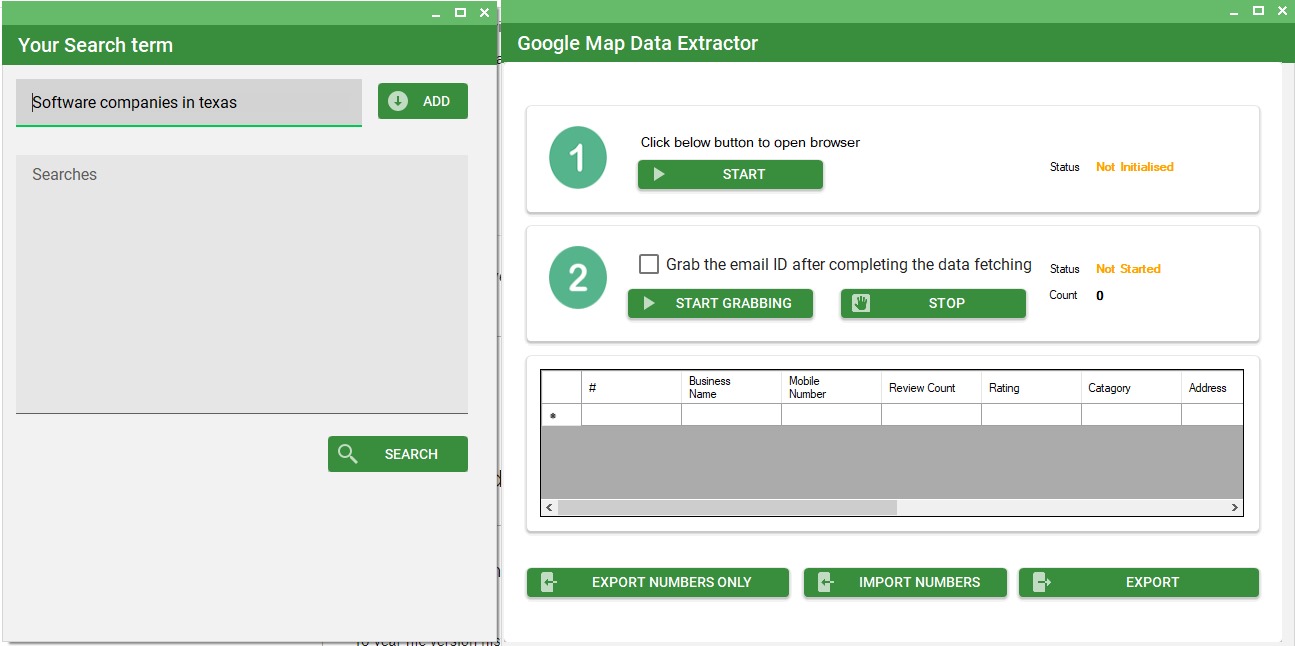
Google Map Data Extractor - WA Leads Software
The Google Map Data Extractor in WA Leads software allows users to collect business data from Google Maps, including business names, mobile numbers, ratings, reviews, and addresses. This feature is useful for lead generation, marketing, and sales campaigns.
1. Search and Data Extraction Process
A. Search Term Input (Left Panel)
- Users enter a search term (e.g., “Software companies in Texas”) in the text box.
- Click “ADD” to save the search term.
- Previously added search terms will appear in the Searches list.
- Click “SEARCH” to begin the search on Google Maps.
B. Data Extraction Controls (Right Panel)
1. Open Browser & Start Extraction
- Click the “START” button to open a browser and begin the extraction process.
- The Status (top right) will update from “Not Initialized” to “In Progress” once the extraction starts.
2. Grab Email IDs (Optional)
- If email addresses are available, check the box “Grab the email ID after completing the data fetching.”
- Click “START GRABBING” to collect emails.
- Click “STOP” to halt the process at any time.
2. Extracted Data Table
Once the extraction is complete, data will be displayed in a structured table with the following columns:
- Business Name – Name of the company from Google Maps.
- Mobile Number – Contact number of the business.
- Review Count – Number of reviews received.
- Rating – Star rating based on customer feedback.
- Category – Type of business (e.g., Software, Restaurant, Retail, etc.).
- Address – Business location.
3. Data Export and Import Options
Once data is extracted, users can save or use it in other campaigns.
A. Export Options
- “EXPORT NUMBERS ONLY” – Saves only the mobile numbers for marketing campaigns.
- “EXPORT” – Saves all extracted data, including business names, ratings, and addresses.
B. Import Options
- “IMPORT NUMBERS” – Allows users to import a list of previously extracted numbers for use in WhatsApp marketing campaigns.
4. Status Indicators
- Not Initialized – Extraction process has not started.
- In Progress – Data extraction is ongoing.
- Completed – Extraction is finished, and data is available for export.
The Google Map Data Extractor in WA Leads is a powerful tool for collecting business information for marketing, lead generation, and customer outreach. It automates data collection from Google Maps, making it easier to build targeted contact lists.
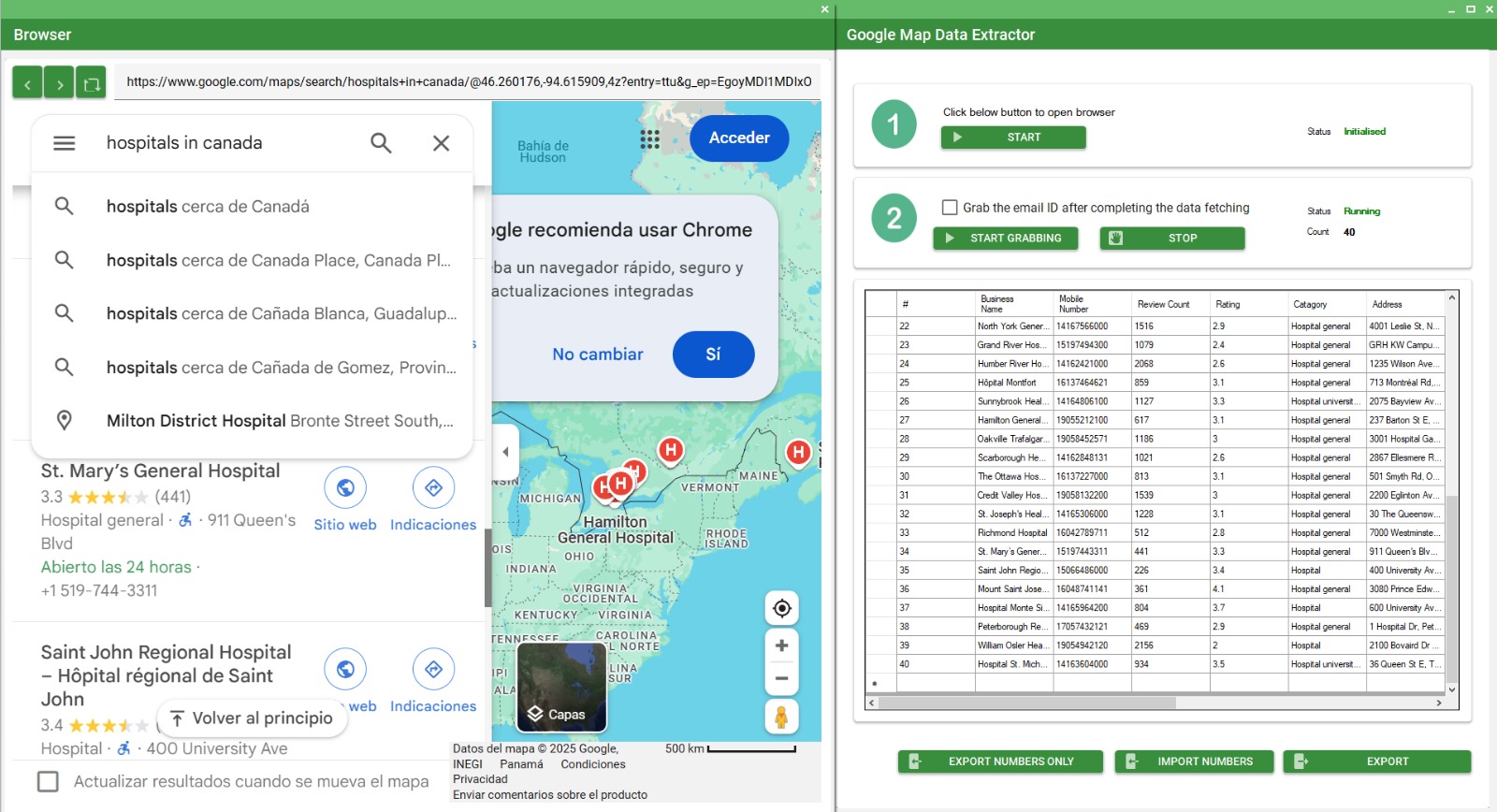
Google Map Data Grabing - WA Leads Software
1. Google Maps Search (Left Side)
- A search for “hospitals in Canada” has been performed on Google Maps.
- Hospitals are listed with details such as:
- Name (e.g., St. Mary’s General Hospital, Saint John Regional Hospital)
- Rating and number of reviews
- Address and contact information (e.g., phone numbers)
2. Google Map Data Extractor (Right Side)
- This software extracts and compiles the hospital data automatically.
- Steps:
- Start: The browser window is opened to run a Google Maps search.
- Start Grabbing: Once search results are loaded, this button captures and extracts relevant data.
3. Extracted Data Table
- Displays the following columns for each hospital:
- Business Name: Name of the hospital
- Mobile Number: Contact number
- Review Count: Number of reviews on Google
- Rating: Average rating from reviews
- Category: Type of hospital (e.g., general, university)
- Address: Full address from Google Maps
4. Export Options (Bottom Buttons)
- Export Numbers Only: Exports only the mobile numbers.
- Import Numbers: Allows importing previously saved numbers.
- Export: Exports all the collected data (names, ratings, addresses, etc.).
Status Indicators
- Initialized: The software is ready for data extraction.
- Running: Data extraction is in progress.
- Count: Shows how many records have been extracted so far (e.g., 40 entries in this case).
Purpose
This tool is useful for:
- Collecting contact details for marketing or outreach.
- Creating databases of healthcare institutions.
- Analyzing hospital data based on ratings, reviews, and locations.
about Waleads.app
WA Leads – Smart, Scalable & Automated WhatsApp Marketing for Business Growth!
Unlock the power of WhatsApp marketing with WA Leads! Automate bulk messaging, generate high-quality leads, and engage customers effortlessly.
✅ Smart Automation – Save time with scheduled & AI-driven messaging.
✅ Scalable Solutions – Reach thousands of customers in one go.
✅ Higher Engagement – Personalized messages for better conversions.
Boost sales, streamline communication & grow your business with WA Leads! 📈🔥
Send messages to thousands of customers instantly.
Schedule and manage WhatsApp marketing effortlessly.
Customize messages to boost customer interaction.
Capture, nurture, and convert leads seamlessly.
Why waleads.app
More Effective WhatsApp Marketing!
Effortless Automation
Streamline your WhatsApp marketing with effortless automation. WA Leads lets you schedule, send, and manage campaigns automatically, reducing manual effort and saving time. Set up personalized messages, follow-up sequences, and promotions, and let the system handle the rest.
Scalable Solutions
WA Leads offers scalable solutions to help you grow your business effortlessly. Whether you're reaching a small group or thousands of customers, our platform handles the scale without compromising performance. Easily manage large campaigns, automate follow-ups, and engage customers.
Personalized Engagement
WA Leads empowers you to create personalized engagement that resonates with your audience. Tailor your messages based on customer preferences, behaviors, and interactions, making each conversation feel unique and relevant. Address customers by name, send customized offers, and deliver.
Lead Generation
WA Leads makes lead generation simple and efficient. Capture potential customers through interactive WhatsApp messages, automated forms, and seamless integrations. Automatically follow up with leads, nurture them through personalized conversations, and guide them down the sales funnel.
Driving digital revenue for our 1000+ satisfied customers
Average Traffic Increase for Clients